

Smart homes are becoming very popular. Many people want to control lights, locks, and cameras with their phones. But to make this work, you need devices like smart home hubs or bridges. These two words sound similar. But they do different jobs. This article will explain the differences between smart home hubs and bridges. It will help you know which one fits your home best.
Credit: www.techtarget.com
What Is a Smart Home Hub?
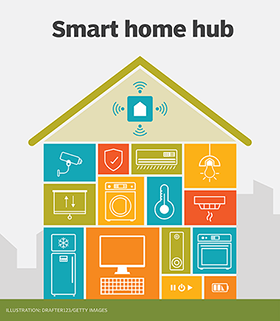
A smart home hub is a device that connects many smart devices. It acts like the brain of your smart home. You can control different devices from one place. The hub talks to lights, thermostats, cameras, and more. It helps them work together smoothly.
Usually, a hub uses special wireless signals like Zigbee or Z-Wave. These signals are made for smart home devices. The hub can connect to your Wi-Fi. Then you control everything from your phone or tablet. Some hubs have their own app or work with popular apps like Google Home or Amazon Alexa.
Key Features Of A Smart Home Hub
- Connects many smart devices
- Uses Zigbee, Z-Wave, or Wi-Fi
- Controls devices from one app
- Can automate tasks and routines
- Works with voice assistants
What Is a Smart Home Bridge?
A smart home bridge is different from a hub. It connects only one type or brand of devices. Think of it as a translator. It helps devices that use one wireless method talk to your Wi-Fi or phone.
For example, Philips Hue lights need a Hue Bridge. The bridge lets your phone control the lights. Without the bridge, the lights cannot connect to Wi-Fi. The bridge sends commands between your phone and the lights.
Key Features Of A Smart Home Bridge
- Connects specific brand devices
- Translates signals to Wi-Fi
- Controls devices from an app
- Usually supports only one device type
- Needed for some smart products
How Do Hubs and Bridges Work?
Both hubs and bridges link smart devices to your home network. But they do this in different ways.
Smart Home Hub Workflow
- The hub connects to many devices using Zigbee or Z-Wave.
- It sends commands to devices when you use an app or voice control.
- The devices respond and perform actions, like turning on a light.
- The hub can run automation, like turning off lights at night.
Smart Home Bridge Workflow
- The bridge connects only one brand or type of device.
- The devices use a special wireless signal to talk to the bridge.
- The bridge connects to your Wi-Fi and phone app.
- You control devices through the bridge’s app or a smart assistant.
Main Differences Between Hubs and Bridges
| Feature | Smart Home Hub | Smart Home Bridge |
|---|---|---|
| Device Support | Supports many brands and types | Supports only one brand or type |
| Function | Central control and automation | Signal translator for specific devices |
| Wireless Protocols | Uses Zigbee, Z-Wave, Wi-Fi | Usually uses one protocol per bridge |
| Automation | Can create complex automations | Limited or no automation features |
| Compatibility | Works with many smart devices | Works only with devices from one brand |
| Price | Usually higher cost | Usually lower cost |
When Should You Use a Smart Home Hub?
If you want to control many devices from different brands, get a hub. It is best for homes with many smart devices. The hub helps all devices work together. You can make rules like “turn on lights when I arrive home.” A hub also works well if you want voice control with Alexa or Google Assistant.
For example, if you have smart lights from one brand, a smart lock from another, and cameras from a third, a hub can connect all. It makes managing your devices easier. You only need one app or voice system.
When Should You Use a Smart Home Bridge?
If you only have devices from one brand, a bridge is good. Many smart lights need a bridge to work. Without it, the lights cannot connect to your phone. The bridge is simple and cheaper than a hub.
For example, Philips Hue lights need the Hue Bridge. The bridge connects the lights to your Wi-Fi. Then you can control the lights from your phone. If you only want smart lights and no other devices, a bridge is enough.

Credit: www.amazon.com
Can You Use Both Together?
Yes. Some people use both a hub and bridges. The hub controls most devices. Bridges connect devices that need them. This way, you get the best of both worlds.
For example, you might have a smart home hub for your locks and sensors. Then use a Philips Hue Bridge for your lights. Both connect to your Wi-Fi but work separately. You control everything from apps or voice commands.
Benefits of Using a Smart Home Hub
- Control many devices in one place
- Create automations and schedules
- Use voice assistants easily
- Works with devices from many brands
- Improve smart home security and convenience
Benefits of Using a Smart Home Bridge
- Simple to set up for one device brand
- Usually less expensive
- Helps devices connect to Wi-Fi
- Good for users with only one device type
- Works well with specific smart products
Things to Consider Before Buying
Think about the devices you have or want. Check if they need a hub or bridge. Also, check if they use Zigbee, Z-Wave, or other signals.
Ask yourself:
- How many smart devices do I have?
- Are my devices from one brand or many?
- Do I want to automate tasks?
- Do I want voice control?
- What is my budget?
Answering these will help you choose the right device.
Summary
Smart home hubs and bridges help control smart devices. Hubs connect many devices from different brands. They allow complex control and automation. Bridges connect only one brand or device type. They act as translators between devices and your Wi-Fi.
Use a hub if you want to manage many devices easily. Use a bridge if you only have devices from one brand. Sometimes, using both together works best.
Knowing the difference helps you build a smart home that fits your needs. Choose wisely and enjoy your smart home experience.
Frequently Asked Questions
What Is A Smart Home Hub?
A smart home hub connects and controls various smart devices in one place. It allows devices from different brands to work together smoothly.
How Does A Smart Bridge Differ From A Hub?
A smart bridge connects specific devices to a network, usually from one brand. A hub manages multiple devices and protocols, offering broader control.
Can A Hub Control Devices Without A Bridge?
Yes, many hubs can control devices directly without needing a bridge. This depends on the devices’ communication protocols and compatibility.
Why Do Some Devices Need A Smart Bridge?
Some smart devices use unique signals that require a bridge to connect with hubs. The bridge translates these signals for the hub.