
Smart home devices are everywhere now. You might have a smart light, a smart speaker, or a smart thermostat. These devices can talk to each other. But how do they do this? How do they share information and work together? This article will explain how smart home devices communicate with each other in simple words.
What Are Smart Home Devices?
Smart home devices are tools you can control with your phone or voice. Examples include smart lights, smart locks, smart cameras, and smart speakers. These devices connect to the internet or a home network. This connection lets them send and receive information. When they work together, they make life easier.

Credit: www.youtube.com
Why Do Smart Devices Need to Communicate?
Imagine your smart door lock tells your smart light to turn on when you enter your home. Or your smart thermostat changes the temperature when you say a command to your smart speaker. For this to happen, devices must talk to each other. Communication helps devices work as a team.
Ways Smart Home Devices Talk to Each Other
Smart devices use different ways to share information. Here are the most common methods:
- Wi-Fi
- Bluetooth
- Zigbee
- Z-Wave
- Thread
1. Wi-fi
Wi-Fi is the same technology your phone or computer uses to go online. Many smart devices connect to your home Wi-Fi. This lets them send information through the internet or your home network.
Wi-Fi is fast and can handle many devices at once. But it can use a lot of power. Some small devices may not use Wi-Fi to save battery.
2. Bluetooth
Bluetooth is a short-range connection. It lets devices talk when they are close, usually within 30 feet. Many smart devices use Bluetooth to connect to your phone first.
Bluetooth uses less power than Wi-Fi. It is good for devices like smart locks or fitness trackers. But it is slower and covers a smaller area than Wi-Fi.
3. Zigbee
Zigbee is a special wireless technology made for smart home devices. It uses less power and works well for small data.
One strong point of Zigbee is the mesh network. This means devices connect to each other and pass messages. The more devices in the network, the stronger the connection.
4. Z-wave
Z-Wave is similar to Zigbee. It also uses a mesh network to connect devices. Z-Wave works on a different frequency, so it has less interference from Wi-Fi.
Z-Wave is popular in smart home security devices. It is good at making sure messages get through.
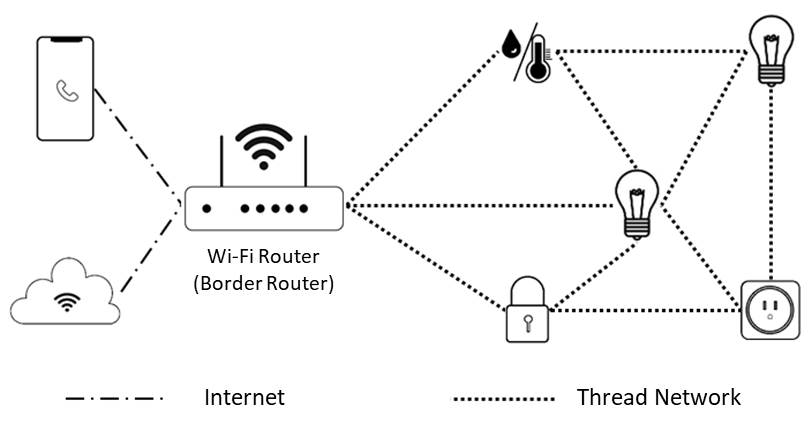
5. Thread
Thread is a newer technology designed for smart homes. It also uses a mesh network. Thread is fast and secure. It can work with other smart home technologies easily.
How Do Devices Find and Talk to Each Other?
Smart devices use special rules to send messages. These rules are called protocols. Protocols tell devices how to start a conversation, share information, and stop the talk.
Some common protocols are:
- MQTT
- HTTP
- CoAP
Mqtt
MQTT is a messaging protocol. It is simple and good for devices with little power. Devices send messages to a central place called a broker. The broker shares messages with other devices.
Http
HTTP is the protocol the internet uses. Some smart devices use HTTP to talk through the internet. This works well for devices that connect to cloud services.
Coap
CoAP is a protocol made for small devices. It is like HTTP but uses less power. It works well with devices on low-power networks like Zigbee or Thread.
What Is a Smart Home Hub?
A smart home hub is a device that helps other devices talk. It acts like a translator and a traffic controller. The hub connects different devices and makes sure messages go where they need.
Some hubs support many protocols. They let devices that speak different languages work together.
Examples of smart home hubs are smart speakers or dedicated hub devices.
How Do Devices Stay Secure?
Security is very important in smart homes. Devices use encryption to keep messages safe. Encryption changes messages into codes. Only the right device can read the message.
Devices also use passwords and keys. These stop strangers from joining your smart home network.
Always update your devices. Updates fix security problems and keep devices safe.
Examples of Device Communication
Here are some simple examples of how devices talk:
- Your smart sensor sees movement and tells the smart camera to start recording.
- Your smart thermostat asks the smart speaker to show the temperature on screen.
- Your smart door lock sends a message to your phone when someone opens the door.
Benefits of Devices Communicating
When devices talk, your home gets smarter. Here are some benefits:
| Benefit | Explanation |
|---|---|
| Convenience | Devices work together to do tasks for you. |
| Energy Saving | Devices adjust to save power and reduce bills. |
| Security | Devices alert you about problems fast. |
| Comfort | Devices create a better home environment automatically. |
Credit: www.allion.com
Challenges in Device Communication
Not all devices speak the same language. Some use Zigbee, others use Wi-Fi. This can cause problems. You may need a hub or bridge to connect different devices.
Sometimes, devices lose connection. This can happen if the network is weak or devices are too far apart.
Security is also a challenge. Weak passwords or old software make devices vulnerable.
Future of Smart Home Communication
Smart home communication is getting better. New standards like Matter aim to let all devices work together easily. Matter tries to solve the problem of different languages.
In the future, your smart home will be more connected and easier to use. Devices will talk faster and safer.
Summary
Smart home devices communicate using different technologies like Wi-Fi, Bluetooth, Zigbee, Z-Wave, and Thread. They use protocols to send messages. A smart hub can help devices talk in one home.
Communication lets devices work together. This makes your home safer, more comfortable, and saves energy.
Understanding how devices talk helps you make better choices for your smart home.
Frequently Asked Questions
How Do Smart Home Devices Connect With Each Other?
Smart home devices connect using wireless networks like Wi-Fi, Bluetooth, or Zigbee. These networks allow devices to share data quickly and easily.
What Is The Role Of A Smart Home Hub?
A smart home hub controls and links various devices in one place. It helps devices talk to each other even if they use different signals.
Can Smart Devices Communicate Without Internet?
Yes, many smart devices use local networks to talk without internet. This keeps your devices working even during internet outages.
How Do Smart Devices Use Wi-fi For Communication?
Wi-Fi allows smart devices to send and receive data over your home internet. It works well for devices needing high speed and range.