

Smart homes are becoming very popular today. Many people use smart devices like cameras, lights, and speakers. These devices connect to the internet. This makes life easier and more fun. But there is a risk. Hackers can try to enter your smart home network. They want to steal your information or control your devices. So, it is very important to protect your smart home network.
What is a Smart Home Network?
A smart home network is a group of devices connected to the internet. These devices talk to each other and to you. Examples are smart lights, security cameras, thermostats, and voice assistants. All these devices use your home Wi-Fi to work. If the network is not safe, hackers can enter and cause trouble.
Why Do Hackers Target Smart Home Networks?
Hackers want to get your personal information. They want to spy on you or control your devices. Sometimes, they use your devices to attack other people’s networks. They look for weak passwords or old software. If your network is easy to break, they will try to enter. So, you must make your network strong.
Steps to Secure Your Smart Home Network
1. Change Default Passwords
Many devices come with default passwords. These are easy to find online. Hackers know them. Change all default passwords as soon as you install devices. Use strong passwords with letters, numbers, and symbols. Avoid simple passwords like “123456” or “password.”
2. Use A Strong Wi-fi Password
Your Wi-Fi password protects all devices on the network. Make sure it is strong. Use a password that is hard to guess. Do not use your name or birthday. A good password has at least 12 characters. Mix uppercase and lowercase letters, numbers, and symbols.
3. Keep Your Devices Updated
Manufacturers release updates to fix security problems. Updates also add new features. Always install updates for your smart devices and router. Turn on automatic updates if possible. This helps keep your devices safe from new threats.
4. Use A Separate Network For Smart Devices
You can create a guest network on your Wi-Fi router. Use this network only for smart devices. Keep your computers and phones on the main network. This way, if a hacker enters the smart device network, they cannot reach your personal devices.
5. Turn Off Devices When Not In Use
If you do not use some smart devices all the time, turn them off. This reduces the chance for hackers to enter. Also, unplug devices that do not need to be always connected.
6. Use Two-factor Authentication
Two-factor authentication (2FA) adds extra security. It asks for a second form of ID, like a code sent to your phone. Use 2FA for device accounts and the apps you use to control smart devices. This makes it harder for hackers to log in.
7. Disable Unused Features
Some smart devices have features you do not use. Turn off these features. For example, if your camera has remote access and you don’t use it, disable it. Fewer features mean fewer chances for hackers.
8. Secure Your Router
Your router is the heart of your smart home network. Change the router’s default password. Update the router’s firmware regularly. Turn on the firewall in your router settings. This helps block harmful traffic.
9. Use Encryption
Encryption scrambles data so hackers cannot read it. Use WPA3 security if your router supports it. If not, use WPA2. Avoid older types like WEP because they are not safe.
10. Monitor Your Network
Watch for strange activity on your network. Many routers have apps that show connected devices. Check this list often. If you see unknown devices, block them and change your password.

Credit: www.pcmag.com
Important Tips for Smart Home Safety
- Never share your passwords with friends or strangers.
- Use unique passwords for each device and account.
- Read device manuals to understand security settings.
- Turn off Wi-Fi when you are away for a long time.
- Be careful with smart device apps. Only install apps from trusted sources.
Common Smart Home Devices and Security Tips
| Device | Security Tip |
|---|---|
| Smart Cameras | Change default passwords and disable remote access if not needed. |
| Smart Lights | Keep firmware updated and use secure Wi-Fi networks. |
| Voice Assistants | Use strong passwords and review privacy settings regularly. |
| Smart Locks | Enable notifications and use two-factor authentication. |
| Smart Thermostats | Update software and monitor access history if available. |
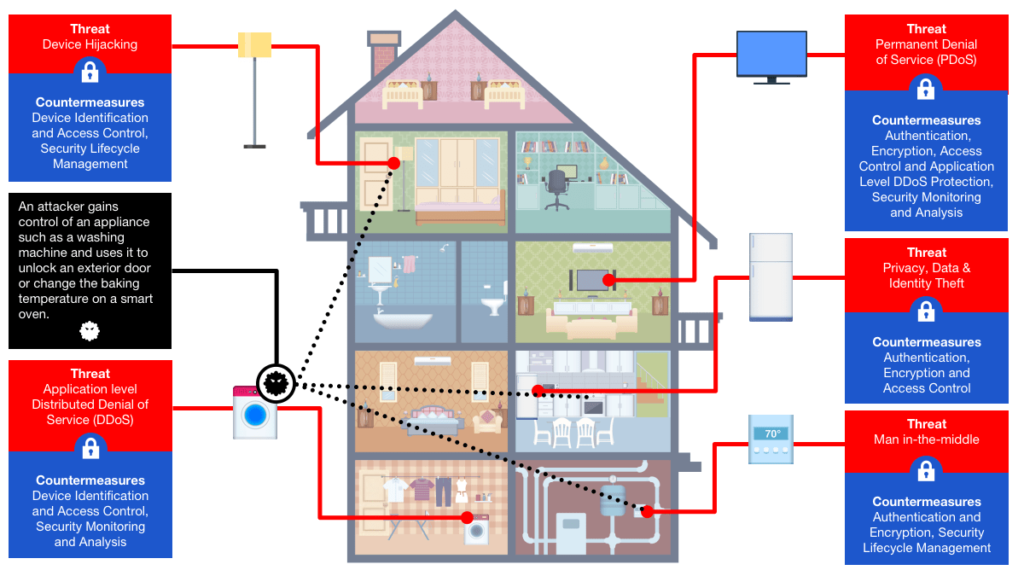
Credit: www.rambus.com
What to Do If You Think Your Network Is Hacked
If you notice strange behavior, act quickly. Disconnect your smart devices from Wi-Fi. Change all your passwords immediately. Update all devices to the latest software. Contact your device maker or internet provider for help. It is better to be safe than sorry.
Frequently Asked Questions
How Can I Protect My Smart Home From Hackers?
Use strong, unique passwords for all devices and your Wi-Fi network. Update software regularly to fix security bugs.
What Is The Best Wi-fi Security For Smart Homes?
WPA3 is the most secure Wi-Fi protocol for smart homes. It encrypts data better than older versions.
Should I Use A Separate Network For Smart Devices?
Yes, creating a guest or separate network limits access to your main devices. It improves security.
How Often Should I Update Smart Home Device Firmware?
Update firmware as soon as updates are available. These updates fix security flaws and improve performance.
Conclusion
Securing your smart home network is very important. Hackers try to find weak points. You can stop them by following simple steps. Change passwords, update devices, and use strong Wi-Fi security. Keep an eye on your network and devices. When you do these things, your smart home stays safe and private. Enjoy your smart devices without worry.