
Smart homes are becoming more popular today. Many people use devices like smart lights, thermostats, and cameras. But have you ever wondered how these devices talk to each other? How do they work together to make life easier? This article will explain how smart home devices communicate. We will use simple words and easy examples. Let’s start!
What Are Smart Home Devices?
Smart home devices are tools that connect to the internet. They can be controlled from phones, tablets, or computers. Examples include:
- Smart lights that turn on or off automatically
- Smart thermostats that adjust the temperature
- Smart locks that open doors without keys
- Smart cameras that watch your home
These devices make homes safer and more comfortable. But for them to work well, they need to communicate with each other.
How Do Smart Devices Talk to Each Other?
Smart devices use different ways to send messages. They can use wires or wireless signals. Most smart homes use wireless communication. This means devices send signals through the air. There are many methods for this communication. The most common are:
- Wi-Fi
- Bluetooth
- Zigbee
- Z-Wave
Let’s look closer at each one.
Wi-fi
Wi-Fi is the same technology used to connect to the internet. Many smart devices use Wi-Fi to talk to each other. It lets devices send data fast and over long distances. For example, a smart camera can send video to your phone using Wi-Fi. But Wi-Fi uses a lot of power, so some small devices do not use it.
Bluetooth
Bluetooth is for short distances. Devices like smart speakers and locks use Bluetooth. It uses less power than Wi-Fi. But the range is shorter. Usually, Bluetooth works within 30 feet. It is good for devices close to each other.
Zigbee
Zigbee is a wireless system made for smart homes. It uses very little power. Devices using Zigbee can form a network called a mesh network. In this network, devices pass messages to each other. This helps signals travel farther. It is good for lights and sensors.
Z-wave
Z-Wave is similar to Zigbee. It also uses a mesh network. It is easy to set up and works well with many devices. Z-Wave devices can send signals up to 100 feet. It is popular in smart home systems.
What Is a Mesh Network?
A mesh network is a way devices connect together. Instead of each device talking to a central hub only, they can talk to each other. This helps signals travel farther and faster. If one device is far away, the message can hop through other devices.
For example, if your smart light is far from the hub, the signal goes through other lights. This way, the message still reaches the device. Mesh networks make smart homes more reliable.
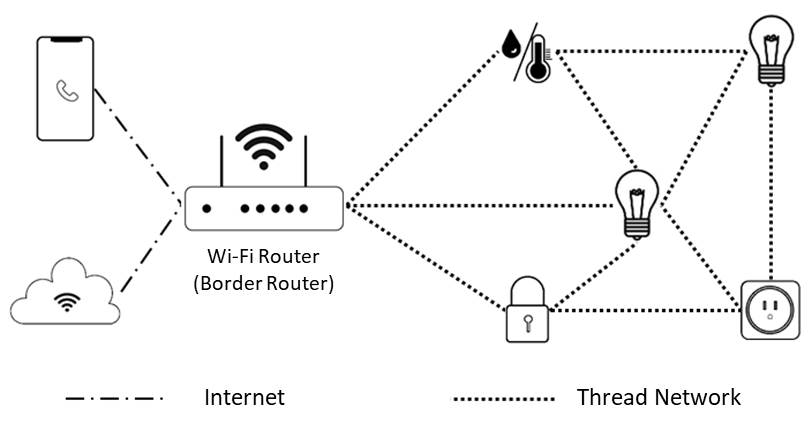
Credit: www.allion.com
What Is a Hub?
A hub is like the brain of a smart home. It connects many devices and helps them talk. Some hubs use Wi-Fi, Zigbee, or Z-Wave. The hub sends commands and collects information. For example, when you tell your phone to turn on the light, the hub sends the signal to the light.
Not all smart homes need a hub. Some devices talk directly to your phone or to each other. But many systems use a hub to keep things organized.
How Do Devices Share Information?
When devices communicate, they use rules called protocols. These protocols decide how messages are sent and understood. If devices use the same protocol, they can work together easily.
Think of protocols as languages. If two people speak English, they understand each other. If not, they need a translator. In smart homes, protocols help devices “speak” the same language.
Common Protocols
| Protocol | Used For | Range | Power Use |
|---|---|---|---|
| Wi-Fi | Internet connection, video, audio | Up to 150 feet indoors | High |
| Bluetooth | Short distance device control | About 30 feet | Low |
| Zigbee | Smart lights, sensors | Up to 100 feet (mesh network extends) | Very low |
| Z-Wave | Locks, sensors, lights | Up to 100 feet (mesh network extends) | Low |
How Do Devices Respond to Each Other?
Smart devices can work together in groups. When one device changes, others can react. For example, if a smart door opens, the lights can turn on automatically. This is called automation.
Automation makes homes smarter and more useful. Devices send signals to trigger actions. These signals travel using the communication methods we talked about.
How Do You Control Smart Devices?
You can control devices using apps on your phone or voice assistants. Voice assistants like Alexa or Google Home listen to your commands. They send messages to the hub or directly to devices.
For example, if you say “Turn on the lights,” the voice assistant sends a command. The smart light receives it and turns on. This communication happens quickly over Wi-Fi or other networks.
Security in Smart Home Communication
Security is important. Devices send personal information and control your home. So, they use encryption to protect messages. Encryption means messages are scrambled. Only the correct device can read them.
Always use strong passwords and update your devices. This helps keep your smart home safe from hackers.
Why Is Communication Important in Smart Homes?
Without communication, devices cannot work together. Each device would be alone. You would have to control each device separately. This is hard and takes time.
Good communication lets devices help each other. Your home becomes more comfortable, safe, and easy to use.

Credit: www.youtube.com
Summary
Smart home devices use wireless signals to talk. Common methods are Wi-Fi, Bluetooth, Zigbee, and Z-Wave. Many devices connect using a mesh network. A hub helps manage the devices. Devices follow protocols to understand messages. They can work together using automation. You control them with apps or voice assistants. Security keeps communication safe. Good communication makes smart homes useful and fun.
Now you know how smart home devices communicate. The next time you use a smart device, you will understand the magic behind the scenes.
Frequently Asked Questions
How Do Smart Home Devices Connect With Each Other?
Smart home devices connect using wireless signals like Wi-Fi, Bluetooth, or Zigbee. These signals allow devices to share data and work together seamlessly.
What Role Does A Smart Home Hub Play?
A smart home hub acts as a central controller. It links different devices so they can communicate and be managed from one place.
Can Smart Devices Communicate Without Internet?
Yes, many smart devices use local networks or Bluetooth to communicate without internet. This keeps your smart home working even if Wi-Fi is down.
How Do Smart Devices Send Commands To Each Other?
Devices send commands through wireless protocols like Zigbee or Z-Wave. These protocols ensure fast and secure message delivery between devices.