

Smart homes are becoming very popular. They help us control lights, locks, cameras, and more. But smart devices connect to the internet. This means hackers can try to break into your home network. Keeping your smart home safe is very important. Let’s learn how to protect your smart home network from hackers.
What Is a Smart Home Network?
A smart home network connects all your devices. These devices include smart bulbs, thermostats, cameras, and speakers. They use Wi-Fi or other ways to talk to each other. This network lets you control your home from a phone or voice assistant. But if the network is not safe, hackers can get inside.
Why Do Hackers Want to Break Into Smart Homes?
Hackers want to steal information. Sometimes, they want to spy on you. They may want to control your devices. They can turn off your lights or unlock your doors. This is dangerous for your family and your privacy.
Steps to Secure Your Smart Home Network
Here are easy steps to keep your smart home safe. Follow them one by one.
1. Change Default Passwords
Many smart devices come with default passwords. These are easy to guess. Hackers know these default passwords well. Always change the password when you set up a new device. Use a strong password with letters, numbers, and symbols.
2. Use A Strong Wi-fi Password
Your home Wi-Fi is the main entry point. If the Wi-Fi password is weak, hackers can enter easily. Make sure your Wi-Fi password is long and hard to guess. Avoid simple words or numbers like “12345678.”
3. Keep Your Devices Updated
Smart devices get software updates often. These updates fix security problems. When you ignore updates, hackers can use old problems to get in. Turn on automatic updates if possible. Always update your devices when new software is ready.
4. Use A Separate Network For Smart Devices
You can create a guest network on your router. Use this network only for your smart devices. Keep your computers and phones on a different network. This way, if hackers get into the smart network, they cannot reach your important devices.
5. Turn Off Unused Features
Many devices have features you do not use. For example, remote access or voice control. Turn off features you do not need. This lowers the chance for hackers to find a way in.
6. Use Two-factor Authentication (2fa)
Two-factor authentication adds extra safety. It asks for a second code when you log in. This code can come to your phone or email. Even if a hacker has your password, they cannot enter without the code.
7. Secure Your Router
The router is the heart of your home network. Change the router’s default admin password. Disable remote management if you don’t need it. Update the router’s firmware regularly to fix security holes.
8. Use A Firewall
A firewall helps block unwanted traffic from the internet. Many routers have built-in firewalls. Make sure your firewall is turned on. It acts like a gatekeeper for your network.
9. Monitor Your Network
Keep an eye on the devices connected to your network. Most routers show a list of connected devices. Look for devices you do not recognize. If you see a strange device, change your Wi-Fi password right away.
10. Be Careful With Public Wi-fi
Do not connect your smart devices to public Wi-Fi. Public Wi-Fi is not safe. Hackers can watch traffic and steal information. Use your home network or a trusted network only.
Examples of Good Smart Home Security Practices
| Action | Why It Helps | How to Do It |
|---|---|---|
| Change Default Passwords | Prevents easy hacking | Use strong, unique passwords for each device |
| Use Separate Networks | Keeps smart devices isolated | Create guest Wi-Fi network for smart devices |
| Update Software Regularly | Fixes security flaws | Enable automatic updates or check weekly |
| Enable Two-Factor Authentication | Adds extra login security | Turn on 2FA in device or app settings |
Simple Tips to Remember
- Always use strong passwords.
- Keep your devices up to date.
- Use separate networks for smart devices.
- Turn off features you don’t use.
- Check connected devices often.

Credit: www.pcmag.com
What to Avoid
Here are things you should never do to keep your smart home safe.
- Don’t use the same password everywhere.
- Don’t ignore software updates.
- Don’t share your Wi-Fi password with strangers.
- Don’t connect smart devices to unknown networks.
- Don’t leave default settings on your router and devices.
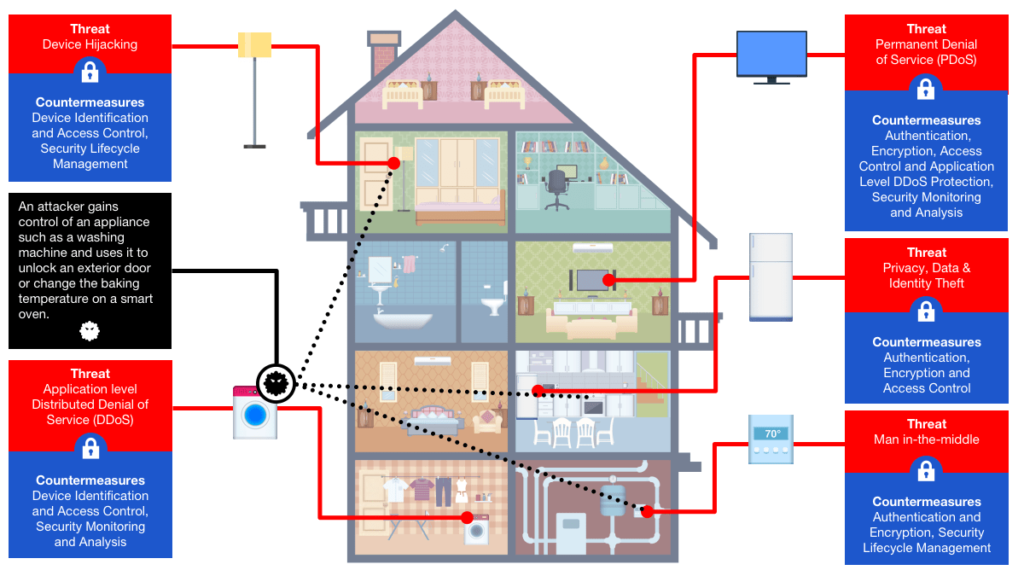
Credit: www.rambus.com
Frequently Asked Questions
How Do Hackers Access Smart Home Networks?
Hackers target weak passwords and outdated software to enter smart home systems. They exploit unsecured Wi-Fi and devices without proper security settings.
What Is The Best Password For Smart Home Devices?
Use long, unique passwords with letters, numbers, and symbols for each device. Avoid simple words or common sequences like “12345” or “password. “
Why Update Smart Home Device Firmware Regularly?
Firmware updates fix security weaknesses and bugs that hackers can exploit. Regular updates keep devices protected and running smoothly.
How Does A Guest Network Protect My Smart Home?
A guest network separates visitor devices from your smart home devices. This limits access and reduces risk if a guest’s device is infected.
Conclusion
Smart homes make life easier. But they can also bring risks. Hackers want to get into your network. You can stop them by taking simple steps. Change passwords, update devices, and use separate networks. Watch your network and be careful online. These easy actions protect your home and family. Stay safe and enjoy your smart home with peace of mind.